
Website: Sim Logical
Number of Mods Listed: 161
Active Status: Inactive
Requests: Closed
Other Facts/Information About Boiling Oil: Female, Seventies, From London* Also goes by Inge
*Found on MATU & is active on that forum
The following are all known mods listed for the creator Sim Logical. If any mods aren’t working or if I’m missing any mods by this creator, please use the contact page to email me.
1.) 4 Keyholder Doors – This mod can be found in the Door Mods Subcategory
Download:
4 Keyholder Doors adds special lockable doors that let you control exactly which Sims are allowed to enter certain rooms or areas of a lot. Instead of locking a door for an entire group, you can assign up to four individual Sims as keyholders.
Both Sims who live on the lot and visiting Sims can be given a key. The Sim needs to be present on the lot when you first assign them as a keyholder, but the door remembers them afterward. This means a visitor who has been given a key can leave the lot, return later, and still be allowed through the door.
The doors have two main settings:
Unlocked: The door works normally and any appropriate Sim can pass through it.
Locked: Only Sims who have been assigned as keyholders can enter the restricted area. Certain NPCs are also allowed through so that necessary services aren’t prevented from functioning.
The locking system is directional. The green placement arrow determines which side of the door is considered the restricted area. When the door is locked, Sims without a key cannot pass through the door in the direction of the arrow, but they can still travel in the opposite direction. This allows you to keep Sims out of a private room without accidentally trapping somebody inside it.
For example, you could use one for a Sim’s private bedroom. Give that Sim a key and lock the door. Other household members and visitors won’t be able to wander into the bedroom, but anyone who happens to already be inside can still leave.
This makes the doors useful for things such as private bedrooms, offices, employee-only areas, apartments or shared houses, clubs, dorm-like setups, or other rooms where only particular Sims should have access.
There are a few limitations to keep in mind. The doors aren’t intended to replace every normal Maxis door on a lot. In particular, they may interfere with behaviors associated with front doors and bathroom privacy, and diagonal placement isn’t supported. Moving an already configured door can also interfere with its saved keyholder information.
2.) Adopt In Poverty – Found in the Adoption Mods Subcategory
No more adoption refusals due to lack of funds.
3.) Age Group Tweak – This mod can be found in the Aging Mods Subcategory
Set custom aging days for your Sim with SimPE. You need to enter the numbers as one less than the number of days you want the age to last. For example if you put “6” for a teen, they will be a teenager for 7 days. This is applied to a Sim at the time of transition, so edits to this file start to affect each Sim at his or her next age transition.
4.) Age Up Anytime Cakes – This mod can be found in the Aging Mods Subcategory
Let’s any Sim skip the required waiting days to age to the next phase, including the elders you want to kick the bucket.
5.) Air Conditioning – This mod can be found in the Misc Home Mods
Works indoors only – to make it realistic. Will maintain the temperature of any Sim in the room at around the optimum. Extremely cold or hot Sims will take about an hour to reach a comfortable temperature with one unit in the room. More units in a room will change your Sims’ temperature faster. There is also a menu option to Warm Up or Cool Off which they do by going and standing under it or nearby, and works twice as fast. This option is autonomous depending on need, and in my tests all Sims decided by themselves to cool off or warm up before they collapsed. Object found under Small Electronics for §250
6.) Alarm Clock – This mod can be found in the Misc Home Mods
More flexibility than your average alarm clock. This one can have the time set freely, to the nearest hour; and also which days it should operate on. It can be set to wake a named Sim, regardless of whether the alarm is in the same room. Or it can wake everyone in the room, or everyone on the lot. There is an on/off switch so you can have it not operating for several days without having to redo your settings
7.) Always Stocked Fridges – This mod can be found in the Fridge Mods Subcategory
Refills your fridge with food at about midnight every night
8.) Annoying Game Suit – This mod can be found in the Inventory Mods Subcategory
This system, known as AGS (Annoying Games Suite) will require that Sims have in their inventory, or on the current lot, a relevant buyable permission object related to the activity before they can initiate it. For example, if you get a group of sims on a lot, and one of them has a kickybag in his inventory, the sim with the kickybag can start the game, and any of the others can join it. But none of the others can start the game. If the kickybag permission object was bought and placed anywhere on the lot, any sim on the lot can start a game of kickybag. Although the name of this suite refers to games, I will be expanding it to include other types of activity.
Buying Objects: All Permission Objects can be found in Misc/Misc priced §2. The bias object and ban object look like a multi-coloured and a black tip jar respectively and are also found in that same place. All objects can be placed on shop shelves and sold. As a useful side-effect, Permission Objects do not work while they are sitting on a shop display shelf. This is a useful feature for if you don’t want an object to work all the time – just move it onto a display shelf temporarily.
Core Files:
CustomGlobals – Makes the system work
Pick One “Flavor”
Flavor Flexible – Flexible allows you to tell a Sim to initiate an action whether or not a Permission Object is in place. It also allows Sims to have the action “pushed” onto their queue by a controller or another Sim.
Flavor Strict – Strict means even the player cannot tell the Sim to do it unless a Permission Object is in place, and in most cases attempts by the game to push it onto their queue should fail too (or it will drop out of the queue).
Permission Objects – These are buyable (and sellable in shops) objects with meshes that look like what they’re related to. But they are not the actual EAxis object adapted. They are simlogical objects with thier own GUIDs and therefore should not clash with any other hacks. They are usable as decorative objects if you do not decide to use the rest of the system. Included are the: baseball, binoculars, bug bots, diary, firefly jar, fishing rod, football, juggling ball, kickbag, pillow, read with mother, rubik cube, water balloon, book of pranks
Book Of Kids Games – Allows teens and younger to choose the interactions joybuzzer, noogie, splash, static charge prank, tease, ventrilofart, waterballoon prank
Kid Games For Adults – Allows young adults and older to choose the interactions bathtub boat, cops and robbers, dance on toes, jump on bed, mary mack, play pirate, play rps, play tag, punch U me, red hands, show off, snow angel, snowball, snowman, tickle
Object Bias – Bias object. Will increase fun advert for AGS objects in inventory (if in inventory) or on lot (if placed on lot). Also sets affected Sims’ fun levels to mid-point each time sim considers performing affected interaction. Suggest restricting use of object to “gimmick” sims, lots or situations rather than a serious family home.
Object Ban – Ban object. Placed on lot, prevents sims using AGS Permission Objects in their inventories, but still allows use of AGS objects on lot. Placed in inventory, prevents sim using AGS Permission Objects on lot, but still allows them to use AGS items in their inventory.
Permissions Plugins – The plugins contain the actual overrides to the EAxis game code. They are named in a way that makes it obvious which behaviour they apply to. You should only install the ones you want. If you do not install the kickybag plugin, then Sims will play kickybag under the same conditions EAxis intended. If you have another modder’s no-autonomy or less-addictive mod for any particular behaviour and you prefer their mod, then you should not install the AGS plugin for the same behaviour.
9.) Apartment Fixes – This mod can be found in the Apartment Mods Subcategory
This helps fix a myriad of issues with Sims in apartments. This is a group of fixes specifically designed to make non-playable and not-in-play neighbors in an Apartment lot behave more logically.
IE:
– Neighbors unnecessarily going in and out of their apartments
– Neighbors given suitable bedtimes set based off how lazy/active they are.
– Fixed Roommates to properly use facilities of the apartment including a bed. Going to work or errands will not refresh their needs with the exception of hunger.
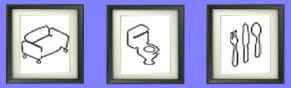
By using the wall pictures below in any combination, you can indicate to the not-in-play neighbors that they need to come out to satisfy certain motives, that they cannot find these facilities in their own rooms, cells or apartments. The “nothing” indicator also tells the landlord not to bother having a Saturday party. You may prefer to add this picture only to your playable apartment rather than the communal areas, because then you can delete it easily if you change your mind about how sociable you want to be.
10.) Apartment Token – This mod can be found in the Apartment Mods Subcategory
Part of Simlogical’s pre-Apartment Life apartment system. It allows players to designate rooms as belonging to particular Sims, making it possible to divide a normal residential building into separate private living areas. When used with the Security Controller and compatible doors, Sims can be restricted to their own apartments while still sharing common areas. It does not create an official Apartment Life apartment lot, but instead uses room access restrictions to simulate apartment-style living.
11.) Arbitrary Grade Suppression Fix – This mod can be found in the Aging Mods Subcategory
When using any kind of aging hack, you may find your children and teens are not having their school grades appropriately adjusted. This is due to some really quite unnecessary code EA wrote to disallow performance grade adjustments on the same day a child ages up. You can get round this either by aging them on one further day after their birthday using something like the SimBlender, or by putting this patch in your downloads
12.) Auto Teleporter – This mod can be found in the Teleportation Mods Subcategory
Put this hydrangea on the corner of your lot near the pedestrian portal. Use its menu to select opening and closing time of your business or other daily event, and tell it the maximum number of Sims you’d want on your lot at any one time. Each half hour it will send you a selection of visitors up to your maximum population. Toddlers and babies are not generated at all, and children only between 7am and 7pm.
Soon after closing time, this shrub will make your teleported visitors feel exhausted and want to go home. Does not affect visitors who came to the lot by other means.
13.) Automatic Cash Register – This mod can be found in the Cashering Mods Subcategory
Sims walk past this on the way out and have their shopping and credit cards scanned instantly. It also gets them to leave after purchasing so they don’t hang about being a nuisance.
14.) Automatic Open Sign – This mod can be found in the General Businesses Subcategory
This is a separate object and does not override the original shop sign.
The Automatic Open Sign is essentially an upgraded version of the Open for Business shop sign that lets you put your Sim’s business on a schedule. Instead of manually opening the business, calling employees in, closing the business, and sending employees home every day, the sign can do those things automatically at times you choose.
The sign can automatically handle four separate events:
Open the business
Close the business
Call employees to work
Send employees home
Each of those gets its own time setting, which is particularly useful because your employees don’t have to arrive at the exact moment the store opens.
You can temporarily turn the schedule off
The sign can be switched between Automatic and Manual control. This is useful if, for example, your store normally opens every day but you decide you want it closed tomorrow. You can switch the sign to Manual the night before so the automatic schedule doesn’t run.
Importantly, this is a separate custom object and doesn’t replace the normal Maxis Open/Closed sign. Simlogical recommends using only one Automatic Open Sign per lot. There is also a special consideration for community-lot businesses: Simlogical recommends placing an original Maxis sign on the lot as well (without actually using it) if you don’t want the business to immediately behave as open and summon employees when the owner arrives.
15.) Automatic Restock Sign – This mod can be found in the Restocking Subcategory
A sign when placed will autostock your shops inventory. There are three options for this mod.
One: Start Auto Restock at Cost (owner has to pay normal price and needs craftables in his inventory)
Two: Start Auto Restock for Free (all items restocked free and craftables appear out of thin air)
Three: Stop Auto Restock.
Sign will check around every 15 sim minutes. No animation is required on the part of any sim. Items just appear in their appropriate places.
16.) Bathroom Door – This mod can be found in the Door Mods Subcategory
Place this door with the green arrows pointing into the bathroom. When a Sim enters the bathroom, the door locks behind them and no one else, not even NPCs, can get in. When the Sim comes out, the door is left unlocked ready for the next person. Occasionally, if Sims pass each other on the way in or out, the door will be accidentally left unlocked while one is in there. If you then get more than one Sim in the bathroom, each time one leaves they will leave the door unlocked behind them, which means another Sim can walk in on the remaining one, and so on and so on, just like in real life. Any time you want, you can use the door’s menu to lock or unlock it if the Sims have messed things up in this way, but it’s not necessary, it will sort itself out when the last of the bunch leave. Needless to say, this door is not effective in two-door bathroom layouts!
The door has the additional bonus of stopping toddlers entering by themselves, to keep them from the toilet, whilst allowing them to leave freely. This means they can be carried in for their bath, and let themselves out if they are put down in the room afterwards.
17.) Bathroom Door Numenor Glass – This mod can be found in the Door Mods Subcategory
Here is a bathroom version of Numenor’s glass door! (Does not work on diagonal) To use this you must have Numenor’s mesh from MTS2
18.) Beach Portals For Normal Lots – This mod can be found in the Beach Mods Subcategory
Allows beach portals to be placed on lots that were not originally created as beach lots. These special portals can be added in Buy Mode, making it possible for Sims to access beach-related areas and interactions on custom or modified lots where the normal beach portals are missing. Useful for creating or repairing beach-style lots without being limited to the game’s standard beach-lot setup.
19.) Bed Reserving Patch – This mod can be found in the following categories:
// Bed/Bedroom Mods Subcategory
// Ownership and Assigned Objects Subcategory
Allows regular Maxis and compatible custom beds to be automatically reserved for individual Sims. When the player directs a Sim to sleep in a bed, that bed becomes assigned to them, helping prevent other Sims from autonomously choosing the wrong bed. Autonomous sleeping does not assign ownership. Each side of a double bed can have its own owner, and beds can be reassigned simply by directing another Sim to sleep in them. Unlike Simlogical’s separate Reservable Beds, this is a global patch that allows a much wider variety of beds to use the reservation system.
One distinction worth noting: Reservable Beds and the Bed Reserving Patch listed immediately underneath them are two different downloads. The Reservable Beds are specific custom beds with an assignment menu, while the Bed Reserving Patch attempts to add automatic ownership behavior to any bed in the game.
20.) Bed Wetting – This mod can be found in the Children Mods Subcategory
Affects any child if their aspiration level is low OR if they were not potty trained. Affects teenagers of both sexes if their aspiration level is low, and if they already used to wet their bed as a child. Player can avoid bed wetting in vulnerable children by waking the Sim before their bladder is 3-quarters full. Trigger point is -50. This release includes a custom memory “Wet the Bed” so that teens won’t start to wet the bed just because they couldn’t get to the toilet once when they were awake. You must keep both files together and not delete the memory without the hack that uses it.
21.) Bladderful Fountain – This mod can be found in the Hygiene & Water Mods Subcategory
Useful with a pay toilet to increase revenue! Fountain increases bladder filling for any Sim in the same room or open space other than current (selectable) family.
22.) Boarding School – This mod can be found in the School Mods Subcategory
Child goes to school on Monday morning and returns on Friday at 4pm. If they miss the bus on Monday, the bus will also come on the following day and so on. Fees payable. Uniform. If you change the child’s school while they are away for the week, they will come home the same day if before 4pm or next day if you do it later. Warning – changing school mid-week makes your child lose a grade. This wasn’t intentional, but it’s fairly realistic anyway. Walk or fly to school not available with this school.
23.) Bottomless Feeding Bottle – This mod can be found in the Bottles & Breastfeeding Subcategory
An endless baby bottle that doesn’t run out. Conflicts with Boiling Oil’s & Inge Jones
24.) Breakup Anytime – This mod can be found in the Relationships Subcategory
Any sim who is married, engaged, or going steady will have the “Break up” option on the partner’s menu regardless of the state of their relationship. Neither Sim will move out, so you get the chance to decide what they do about seperating.
25.) Ceiling Lamp Hider – This mod can be found in the Cleaner Gameplay Mods Subcategory
Hides all objects attached to ceilings
26.) Cheaper Old Wreck – This mod can be found in the Vacation Mods Category
Changes the price of the Bon Voyage Pirate Ship (the old shipwreck/beach wreck object) to just §1. This makes it much cheaper to use the decorative wreck when building beach and vacation lots without dramatically increasing the lot’s value. The mod is a simple game override and does not otherwise change how the Pirate Ship functions.
27.) Classroom Controller – This mod can be found in the School Mods Subcategory
Part of Simlogical’s School System used to organize and run lessons in an individual classroom. Place one controller in each classroom and use it to select which class of pupils will attend, assign an adult or elder Sim as their teacher, and choose the subject or classroom activity. Lessons can be started manually, which calls the appropriate teacher and pupils into the room, or scheduled automatically using the built-in weekly timetable. The controller also works with Simlogical’s Classroom Door to keep the correct pupils in the classroom and other students out during lessons. A Home Room option can designate a particular class as the regular users of the room when another lesson isn’t taking place. When used with the Classroom Table and Workbook, the controller can also start Gradework lessons and send pupils to their desks to study.
28.) Classroom Door – This mod can be found in the School Mods Subcategory
Place with the green arrow pointing into the classroom. This keeps in pupils who are meant to be in a lesson, and keeps out those who are not. A pupil may go through the door if the player instructs them to go and do something (such as going to the toilet). Works in conjunction with the classroom controller.
29.) Classroom Table and Workbook – This mod can be found in the School Mods Subcategory
This is NOT the same as the homework table. This is a completely separate object to work with the classroom controller.
When you start a gradework lesson for a class, a book is generated on top of each table, for as many pupils as there are in the class. They will be automatically called to study and woken up if necessary.
The teacher has some power over how well the children study. For example, you must have the teacher selected before you can tell a straying child to come back to his workbook. If teacher leaves the room, most of the kids will jump up and play. They tend to take a while to settle down to work in any case and during that time the teacher will have to keep calling them back to their desks. Some teachers will do this more autonomously than others. Don’t have your teachers too high in fun, or the kids will sense they can mess about
30.) Clothes Change Controller – This mod can be found in the Clothing Mods Subcategory
A system of objects that tell your Sims to change outfits. Usually this will be as they come in through a door. At the moment this set comprises one vase with a menu that allows you to set the outfit to change into, and a global patch that makes all normal doors change your Sim as they walk through. Place in room or rooms that you wish your Sims to change before entering. Use the menu to choose which outfit Sims should change into and whether NPCs should also change.
31.) Clothes Change Patch – This mod can be found in the Clothing Mods Subcategory
This is an optional global patch which will make most normal (non-hacked) doors into outfit changing doors. Does not work reliably on diagonal doors.
32.) Clothes Change and Security Door – This mod can be found in the following categories:
// Clothing Mods Subcategory
// Door Mods Subcategory
This is a special door that can both control who is allowed through it and make Sims automatically change their clothes when they pass through it.
👗 Clothes Change System
The clothes-changing portion works with Simlogical’s Clothes Change Controller mod. You place the controller—a decorative vase—in the room that you want Sims to change clothes before entering. Using the vase’s menu, you choose what type of outfit Sims should put on and whether NPCs should also be affected. When a Sim passes through the special door into that area, the system tells them to change into the selected outfit.
🔐 Security/Apartment System
The same door can serve as the special doorway used by Simlogical’s security system to restrict access.
The important reason this particular door exists is that it’s a non-global alternative. Simlogical also provides an optional global patch that modifies most ordinary Maxis doors so they can participate in the clothes-changing system. If you don’t want to install a global modification affecting normal doors, you can use this special Clothes Change and Security Door instead
33.) Clothes Pay Door – This mod can be found in the following categories:
// Clothing Mods Subcategory
// Door Mods Subcategory
// Open For Business Category
Each side is set separately. For each side you can set how much money, if any, your current family gets when visitors go through the door in that direction, and what, if anything, they should change into. The nude option is not included in this version, but is available from the adult downloads section at Mod The Sims 2. Although both versions have the same GUID, the adult version has an A at the end of the filename so if you are swapping between the versions you will need to remove the unwanted file.
34.) Community Phone – This mod can be found in the Community Lot Mods Subcategory
A standalone version of the original Maxis community-lot telephone without the attached stand. It provides the same functionality as the original community phone but can be placed neatly against a wall. This is a separate custom object and does not replace or modify the game’s original community telephone.
35.) Color Keys System – This mod can be found in the Door Mods Subcategory
The Color Keys System lets you divide Sims into custom groups using six different colored keys. A Sim carries their colored key in their inventory, and other compatible mods can recognize that key to determine where that Sim is allowed to go.
🟢 Put a green key in a room → Sims carrying a green key can enter.
Place as many types of keys into a single room and into a Sim’s inventory and only those with that color key will be able to pass through the door.
🔴 + 🔵 keys in room → Sims carrying either a red or blue key can enter.
It can even work differently in each direction. If a door separates two rooms and one room contains a red key while the other contains a magenta key, red-key Sims can pass toward the red room while magenta-key Sims can pass toward the magenta room.
Keys can be purchased, assigned or removed through the special door, or given to other Sims as gifts. The keys are also recognized by TwoJeffs’ Visitor Controller, allowing entire lots to be restricted according to your custom Sim categories. This makes the system particularly useful for creating social classes, ranks, factions, employee areas, clubs, or other player-created groups that The Sims 2 doesn’t normally recognize. Only the special Color Keys door recognizes room restrictions. If the restricted room has another ordinary door leading into it, Sims without the proper key can simply use that door instead.
36.) Column Hider – This mod can be found in the Hider Mods Subcategory
Hides 1, 2 or 3 story columns
37.) Coming Home Clothes Change Doors – This mod can be found in the Clothing Mods Subcategory
Six in game doors that change Sims into casual when going into the house wearing anything other than formal (e.g. work or swimwear). When going out of the house, the Sim is changed into normal outfit if he is wearing underwear or pajamas. Comes with all original colours but will not automatically pick up user recolours. Does not work on diagonal or after being moved to and from diagonal.
38.) Crib Fix – This mod can be found in the Child Care Mods Subcategory
This is for the problem of parents and nannies getting babies and toddlers out of one crib only to place them in another.
39.) Crib Get Out All – This mod can be found in the Toddler Mods Subcategory
Allows all toddlers to get themselves out of their cribs when they have had enough of being in there. Unfortunately the user cannot force them to do it before they are ready. Will not affect the Reservable Cribs which use their own settings for deciding whether toddlers get out.
40.) Crowd Controller – This mod can be found in the School Mods Subcategory
Has an option to call all pupils into a room, and one to wake up all sleeping Sims.
It’s essentially a convenience/organization tool rather than a necessary part of running classes.
For example, in a boarding school you might put one in the dining hall. Instead of individually directing 15 students to breakfast, you can use the Crowd Controller to bring all the pupils into that room. Or you could put one in an assembly hall, recreation room, cafeteria, gym, or other communal area and quickly gather the entire school there.
It doesn’t appear to assign classes, start lessons, control classroom doors, enroll pupils, or otherwise manage the school system. Those jobs belong to the other School System objects. Simlogical’s own description of the Crowd Controller only lists those two commands.
41.) Days Left Shrub This mod can be found in the Aging Mods Subcategory
Fake menu shows you at a glance how long every Sim on the lot has left in his or her age stage. Useful for predicting the death of elders.
42.) Decorative Porkchop – This mod can be found in the Food Mods Category
A pork chop meal hacked so it is an ornament.
43.) Dog Bathtub – This mod can be found in the Dog Mods Subcategory
This is the wooden bathtub made available for dog bathing only.
44.) Eating And Serving Control – This mod can be found in the Mealtime Mods Subcategory
This is to control, on a room by room basis, where your Sims eat at various times of the day, and whether they can use the tables and/or counters in a room to serve meals onto, and to put things down on. To control counters you need the counter patch and the controller; to control tables you need the table patch and the controller; to control both, you need all three. In rooms and lots where you do not have this controller, your counters and tables will behave normally. The menu is self-explanatory, except that when you disable eating for a particular time of day, it will automatically also disable serving for that time of day. The separate “disable serving” setting is provided for flexibility – for example, if you wish the sims to be able to eat single meals at the kitchen breakfast bar, but eat all group family meals at the table.
Morning=6am-noon, Afternoon = noon-6pm, Evening=6pm-midnitght, Night=midnight-6am
45.) Electric HOB – This mod can be found in the Food Mods Category
Same as the Gas Hob but electric. Does still produce flames of a gas.
46.) Elders Sleep Through The Night – This mod can be found in the following categories:
// Elder Sim Mods
// Sleep Mods
Elders stay asleep until 6am just like other adults. You have to choose between this and the Sleep Later patch, you cannot have them both installed at the same time.
47.) Employee Scheduler – This mod can be found in the Employee Mods Subcategory
The Employee Scheduler is basically an add-on for the Automatic Open Sign that lets you give each employee their own individual work schedule instead of having every employee arrive and leave at the same time. It requires Open for Business and the Automatic Open Sign.
You place one Employee Scheduler token for each employee you want to schedule. To assign a token, that employee must currently be on the business lot. Once assigned, the employee’s picture appears on the token, so you can easily tell which employee it controls. The token remembers the employee after they leave the lot.
You can then set that particular employee’s:
Arrival time — when they should automatically come to work.
Leaving time — when they should automatically finish their shift and go home.
This means your employees don’t all have to work identical hours. For example, if your bakery is open from 8 AM–8 PM, you could have:
Employee A: 7 AM–3 PM
Employee B: 10 AM–6 PM
Employee C: 1 PM–9 PM
That gives you something much closer to actual employee shifts. It also allows manual control. The Scheduler doesn’t force you to wait for the employee’s scheduled time. You can also use their token to call that employee into work or dismiss them manually whenever you want. So if your store suddenly gets extremely busy, for example, you could call another scheduled employee in early.
This is important: the Employee Scheduler requires the Automatic Open Sign mod. Automatic arrival and departure only happens while the Automatic Open Sign is set to Auto. If you switch the sign to Manual, the employees won’t automatically show up according to their schedules.
48.) Endless Buffet Patch – This mod can be found in the Buffet Mods Subcategory
Once your Sim sets up a buffet, it stays full and fresh until he clears it away. May or may not work on custom buffets.
49.) Fake Floor Landing – This mod can be found in the Stair Mods Subcategory
These “landing” objects allow you to get rid of the warped walls and unlevel floors for the situations when it is important to have your wallpaper and windows undisturbed. They allow your sim to assume there is some floor he can walk on, even when you have levelled the floor back down and removed the floor tiles that are visually at the wrong level. Please note, at each fake landing your sim will briefly drop to the level of the real floor grid before jumping back up and carrying on using the stairs. You need to weigh up the pros and cons – form.v.function
How to use
50.) Family Only Door – This mod can be found in the Door Mods Subcategory
Only allows members of currently selected family to pass. On residential lot this means the Sims who live on that lot (not family members from other lots). On community lots, the family who you are controlling have sole use of the door.
51.) Flexi School – This mod can be found in the School Mods Subcategory
No set days and no bus. This is for children who are either educated at home, not educated at all, or who attend a school institution run by the player. No fees. Uniform (unused)
52.) Formal Door – This mod can be found in the Formalwear Mods Subcategory
Sims change into formal as they go through the door. Does not work on diagonal or after being moved to and from diagonal.
53.) Formal Wear Sign – This mod can be found in the Formalwear Mods Subcategory
When this is in a room, it changes all Sims in the room into formal wear under the following circumstances:
– Sim is not an NPC, a vacation local or an employee of an owned lot
– Visibly pregnant Sims
You need to click Activate on the sign’s menu to start it off (means you can use the room for other purposes at times). The current family are not included by default unless you choose for them to be on the object’s menu. Should work in any type of location.
54.) Functional Curtains and Blinds – This mod can be found in the Misc Home Mods
These curtains and blinds are all modified to open and close. They can be put on auto, so they open just after 7am and close just after 7pm, or you can use their menu to tell them to stay open all the time or closed all the time.
55.) Gas HOB – This mod can be found in the Food Mods Category
This sits on a counter without breaking up the flow of your worktop. It looks like just a hob, but in fact all the oven facilities are magically available just below in the cabinet – if you don’t mind your Sim miming a bit
56.) Gender & 4 Key Locking For Normal Doors & Gates – This mod can be found in the Door Mods Subcategory
4-Key Locking: Choose keyholders from list of sims by family, or from “On the lot…” if the required Sim is present at the time. Keyholder locked mode comes into play only when the Maxis option “Lock/Me only” is chosen. The sim that was the active sim when locking the door is allowed through in addition to the stored keyholders, so use a keyholder to lock the door if this is not wanted. Please note that unlike my standalone 4-key doors, this door will be locked from both sides. Also, unlike my standalone doors, this is only as reliable as the normal Maxis locking, which as we know sims sometimes ignore and go through anyway.
Gender Locking: allows you to make it into a restroom door by selecting “males only” or “females only”. These options are in addition to the normal options. So if you choose “females only” and then “lock to family and employees only”, the only sims who can use it will be female members of the family and female employees. To remove the gender restriction, use “either gender” from the menu. The “unlock” option does not remove the gender restriction.
These extra options will not appear on any of the four Maxis restroom doors. It will work unpredictably with other door or routing hacks such as Pescado’s APO or my Security/Apartment System. It should work fine with most custom doors that are just new meshes and not hacked.
57.) Get In Sea Patch – This mod can be found in the following categories:
// Body Temperature Mods Subcategory
// Ocean Mods Subcategory
Sea swimming was already autonomous, but this makes it advertise especially to overheated Sims. This is a patch that overrides Maxis code.
58.) Grownups Act Grown Up – This mod can be found in the Life Stage Mods Category
Changes autonomous behavior so adult and elder Sims are less likely to perform childish activities and interactions that would normally be more appropriate for younger Sims. This helps adults behave in a more age-appropriate manner while still allowing the player to direct them to perform these activities manually when desired.
59.) Half Landing Stairs – This mod can be found in the Stair Mods Subcategory
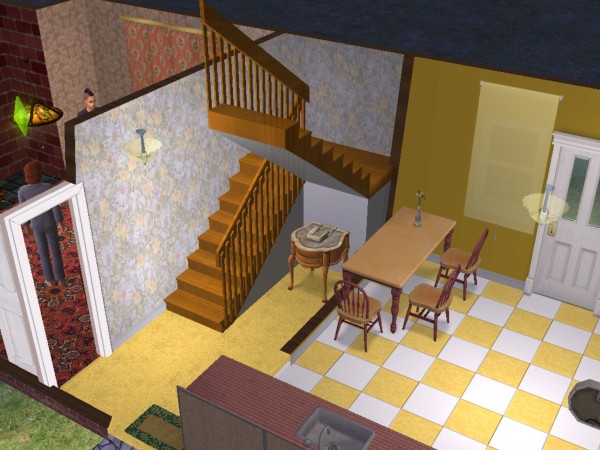
This is a normal (non-modular) staircase for if you want a half landing without using dummy levels or warped walls. Custom non-modular stairs rarely have working animations. Your sim will begin in the right place and end in the right place, and sort of zap between them without walking. You will need to use move_objects to place the stairs in some positions.
60.) Homework Place – This mod can be found in the Homework Mods Subcategory
An alternative for the table which can be placed on any other dining table or dining table clone of your choice. It is an invisible place mat with a visible pencil so you can see where it is.
61.) Home Work Table and Work Table – This mod can be found in the Homework Mods Subcategory
A table you can assign children to not only do their homework but to help improve their grades. Can be used in a normal Sims home or within a community lot designed to be a school.
62.) Hotel Podium – This mod can be found in the following categories :
// Custom Businesses Subcategory
// Hotel Mods Subcategory
This is a separate podium (doesn’t overwrite anything the Maxis one does) that you can use on owned business lots where you want the customers to stay and do other things as well as eating. The usual Maxis one virtually forces them to queue for a meal and then pretty much forces them to go home after eating or if they had to wait too long.
63.) Institution Sign – This mod can be found in the following categories:
// Job Related Mods Subcategory
// School Mods Subcategory
This hack is so that you can stop all processing to do with jobs or schools (no bus, no carpool, no warnings, no grade drops) on lots where the object is placed. This hack suite is for three situations.
1.) You have a residential lot you are playing as a school or prison or some other institution and you don’t want the school bus or car pool turning up and taking some sims away.
2.) You have a normal family home, but occasionally you would like them to all have one or more days off at the same time.
3.) You like to make non-resident sims selectable sometimes but you don’t want these sims being collected for school or work along with the actual family members. If this is the only feature you want, you only need the patches, you don’t need the sign.
Files Included
ijInstitutionSignFT – This is the file containing the object itself. It should be placed on any lot where you sometimes want to stop the car pool or school bus coming. It has two alternative 3D meshes, so it can appear as an institutional looking sign board, or you can use its menu to toggle the model to a shrub, to use it on home lots. This file alone contains no global overrides so may be used as a purely decorative object if you don’t want the patches.
When you first place this object, it will be automatically set to stop job and school car pools and processing if you have the appropriate patches. A menu option allows job and school carpools and processing to go back to normal. To make it actually work to stop school and job processing, you also need one or more of the patches listed below. Each one will likely clash with other non-Simlogical hacks, so you have to choose the combination that will cause you least problems with your favourite hacks.
Job
If you want the hack to affect sims going to work, choose ONE of the following.
ijInstSignPatchAL_Job2009 – Advantage – Allows your sim to use car to go to work if you tell him to even when the sign says no work.
ijInstSignPatchAL_Job201C – Disadvantage – Cannot even drive to work when sign set to no work
School
If you want the hack to affect sims going to school (children and teens), choose ONE of the following.
ijInstSignPatchAL_School201F.zip -Advantage – Allows kids to be driven to school if you want them to even when the sign says no school. Disadvantage – Clashes with TwoJeffs’ school bus bring friend hack & Clashes with Pescado’s AL “Alfixes.package”
ijInstSignPatchAL_School200B.zip – Disadvantage – Cannot even drive to school when sign set to no school. Clashes with Poiple_SummerVacation.package
64.) Invisible Swimwear Gate – This mod can be found in the Misc Home Mods Subcategory
This gate is bright green in Build or Buy mode, invisible in Live mode. In the direction of placement arrows, the sim changes into swimwear, in other direction they change into normal clothing. Remember, in order for the portal function of a door, arch or gate to actually run when the sim walks through, at least one of the two rooms it joins must be a fully enclosed room with walls or fences all the way round.
65.) Invisible “Wet Room” Shower – This mod can be found in the Bathroom Mods Subcategory
A functional shower that becomes invisible during gameplay, allowing you to create custom open or “wet room” style showers without a visible shower stall. It can be placed within your own tiled or specially designed shower area, giving you greater freedom over the appearance and layout of bathrooms while still allowing Sims to shower normally.
66.) Intercom/Baby Alarm – This mod can be found in the Child Care Mods Subcategory
The smaller object (which is meant to be a CD Rom in case you couldn’t recognize it from the picture) is the transmitter, and you place that in the nursery, or any room that you’d like your Sims to be able to detect sound from. It’s best to hide it under some furniture as it can’t be walked over in all circumstances. The larger object goes on the wall of the room where you want the Sims to be alerted, e.g. the parents’ bedroom. It has an on and off setting in case they want a lie in some mornings while another Sim has their receiver on instead. You can use as many transmitters and receivers as you like, and in this version they all share the same “channel”.
67.) Less Autonomy Baby Care – This mod can be found in the Child Care Mods Subcategory
Note: JM Pescado has a babycare hack at MATY which is better updated and supported than this. Warning: some players have found this patch stops sims being able to feed their babies or toddlers at all. If this happens to you, try taking out this patch first!
This patch reduces the Sims’ obsession with their babies and toddlers. It will override parts of the code of Maxis original bathtubs, fridges, cribs and sinks. Some cloned versions of these objects, including the reservable cribs, may ignore this patch.
68.) Less Dripping – This mod can be found in the Broken/Repair Mods Subcategory
Stops broken sinks making that constant dripping noise – which they seemed to go on doing even after being fixed. May not fix a dripping noise which has already started but should prevent it starting.
69.) Less Gurning – This mod can be found in the Needs & Mood Mods Subcategory
Reduces the exaggerated facial expressions Sims make during certain interactions and activities. Sims will still show emotions and facial reactions, but their expressions are toned down so they appear more natural and less excessively animated or distorted. This is primarily a cosmetic mod for players who prefer subtler, more realistic-looking Sim expressions.
70.) Make Bed/Get Dressed – This mod can be found in the following categories:
// Bed/Bedroom Mods Subcategory
// Neat Personality Mods Subcategory
// Sloppy Personality Mods Subcategory
Adds personality-based morning behavior when Sims get out of bed. Depending on their personality, Sims may automatically make their bed and/or change out of their pajamas after waking up. This allows neater and sloppier Sims to behave differently in the morning rather than every Sim following the same routine. This version was specifically designed to be compatible with Simlogical’s Use Inaccessible Beds mod.
71.) Meeting Controller – This mod can be found in the Group Outings Subcategory
Allows you to create a predefined group of Sims and summon them all to a lot at once. Each member of the group is enrolled using an Attendee Token. Starting a meeting brings all enrolled attendees to the lot already greeted and makes them temporarily selectable, preventing them from leaving while the meeting is taking place. Ending the meeting returns them to normal visitor status, while a separate option can encourage all enrolled attendees to go home. It can be used for recurring meetings, clubs, classes, family gatherings, social groups, or simply as an easy way to invite several specific Sims over at once.
Meeting Controller = create a saved guest list and summon/control the entire group whenever you want.
72.) Merola Single Tile Painting – This mod can be found in the Needs & Mood Mods Category
A painting with a huge menu with options to change sims’ motives, age etc. It was made before there were any EPs, it won’t have any settings that were added after the first EP.
73.) Modesty Sign – This mod can be found in the Clothing Mods Subcategory
When this is in a room, it changes all Sims in the room into normal wear under the following circumstances:
– Sims are wearing pajamas, underwear or naked.
-Sim is not an NPC, a vacation local or an employee of an owned lot
– Visibly pregnant Sims
Menu option “Toggle Model” cycles through original sign, hydrangea, vase of flowers, and still life painting. They can be put on the ground or most surfaces, but with the painting it doesn’t really go on the wall just stands on the floor looking like it’s on the wall. Use move_objects if you want to put something else on the same tile under it.
74.) More Realistic Relationship Decay – This mod can be found in the Friendship Mods Subcategory
Normally in The Sims 2, even Sims who are extremely close friends can gradually lose relationship points simply because they haven’t spoken recently. Likewise, two Sims who absolutely hate each other can gradually drift back toward neutral just because they haven’t interacted. This mod makes those extreme relationships more permanent.
How it works
If two Sims have both Short-Term and Long-Term Relationship scores above +95, their relationship stops naturally decaying. They don’t have to constantly telephone or visit each other just to maintain an already very strong relationship. The same thing happens at the opposite extreme. If both relationship scores are below -95, their hatred doesn’t naturally disappear either. This makes enemies feel more believable because simply avoiding someone doesn’t eventually make the game decide, “Well, I guess we’re okay now.”
It doesn’t permanently freeze the relationship
This is an important distinction. The mod only prevents the automatic decay that happens when the Sims aren’t interacting. If they actually interact, their relationship can still change normally. So two Sims with +100 relationship can still become enemies if they start fighting, insulting each other, etc. Likewise, two Sims at -100 can eventually repair their relationship through positive interactions.
The mod also changes relationship decay around the neutral range. Short-Term Relationships between roughly -10 and +10 don’t continually decay toward zero. This helps prevent Sims with only a very minor positive or negative relationship from constantly having their relationship score adjusted simply because they haven’t interacted.
75.) More Useful Apologies – This mod can be found in the Apology Mods Subcategory
This patch is a replacement for the “Appreciate – Apologize” social object – that is a small object the game creates each time a sim apologises to another, and which is removed after the interaction. These objects are intended to make sure both sims know about each other and make their responses in the right place at the right time rather than just when they get round to it, where they happen to be at the time.
This replacement is reprogrammed so that when you instruct a sim to apologise, if the apology is accepted any “furious” state is wiped out, and their relationship is reset to just above zero, (or higher if they got on well before they became furious). Gives them a chance for a real fresh start.
Apologize is not autonomous, so if you want your sims to fight it out to the end, just don’t tell them to apologize.
76.) Mortgages – This mod can be found in the following categories:
// Finances & Money Mods Category
// Misc Home Mods Subcategory
The Simlogical Mortgage Shrubs are basically a way to let your Sims borrow money against the price of a house instead of needing enough cash to buy the whole house outright.
🏠 How the mortgage works. Normally, imagine a house costs §50,000. Your Sim needs §50,000 to move into it. With the Mortgage Shrubs, you can essentially say: “§30,000 of this house is being paid for with a mortgage.”
🌳 The shrubs represent the debt. There are two shrubs:
§1,000 Mortgage Shrub = §1,000 of debt and costs the household §10 per day in interest.
§10,000 Mortgage Shrub = §10,000 of debt and costs §100 per day in interest.
You can use as many shrubs as necessary to create the mortgage amount you want. So a §25,000 mortgage could be represented by two §10,000 shrubs and five §1,000 shrubs. The shrubs therefore have two purposes at the same time: They make the house cheaper to purchase initially, but they charge the family interest every day while the mortgage remains.
💰 How does your Sim pay off the mortgage?
This is the slightly strange part. You sell/delete the Mortgage Shrubs as your Sim earns enough money to repay the debt. Because their purchase and sale values are reversed, getting rid of one effectively makes the household pay back that portion of the loan.
So if your Sim has a §30,000 mortgage and eventually saves §10,000, you could pay off one §10,000 Mortgage Shrub. Now they only owe §20,000.
Eventually you can remove all of the shrubs, meaning the mortgage has been completely paid off.
🚚 What happens if they move before paying it off?
The debt doesn’t magically disappear. If the family moves out while Mortgage Shrubs are still on the property, they don’t receive the full value of the house when they sell it. The outstanding mortgage is taken into account.
The next family that buys the house then gets the house cheaper by the remaining mortgage amount, but they also inherit that mortgage debt and its associated interest payments. So the mortgage essentially stays attached to the property.
77.) Motive Defender – This mod can be found in the Needs & Mood Mods Category
This mod keeps the motives of all the sims on the lot between a pre-set maximum and minimum while you have it switched on at the menu. These maximum and minimum levels are set by editing BCON #1006, which is labelled to help you. In the BCON you can also choose whether it should affect on-duty NPCs and Servos.
78.) Multi-Hider – This mod can be found in the Hider Mods Subcategory
Separate menu options hide and reveal columns of all sizes, connecting columns, trees, ceiling objects, and those fake roof pieces. Also can change appearance between flamingo, hydrangea or CD-Rom. Use move_objects to place hider under other objects.
79.) Nanny Detection – This mod can be found in the Nanny Mods Subcategory
A set of patches that will make your Sims understand that when they have a nanny they do not need to wear themselves out looking after the babies and toddlers themselves. They will still be able to do so if you direct them to, or if a toddler asks them for attention. The patches additionally allow the parents to see to themselves first if they have a full bladder, empty stomach, or about to pass out from fatigue – unless of course you send them to care for the infant first. The Nanny Adapter is a little teddy bear. Allows you to make one or more normal household members have the NPC type flag set to Nanny, so that other members of the household will leave the child care to him or her and get on with their lives. Select sim and click on teddy. Find object near original toy teddy in catalog.
80.) Nanny Fixes for Custom Objects – This mod can be found in the Nanny Mods Subcategory
This is a patch to the nanny template, to enable her to recognize the new FT cribs etc, and probably most custom baby care items too.
81.) No Adults Swinging V1 – This mod can be found in the following categories:
// Life State Mods Category
// Social Activity Mods Subcategory
A patch for the swing to stop adults being able to use it. They can still push the kids.
82.) No Adults Swinging V2 – This mod can be found in the following categories:
// Life State Mods Category
// Social Activity Mods Subcategory
Like the No Adults patch but also stops visiting kids using the swing.
83.) No Aging Patch – This mod can be found in the Aging Mods Subcategory
Stops Sim from automatically aging into the next stage of life when their birthday comes up. You might need
84.) No Autonomy Easel – This mod can be found in the Art/Painting Mods Subcategory
Stops your Sim leaving a half-finished painting on every easel in the house just to be awkward!
85.) No Autonomous Computer Games – This mod can be found in the following categories:
// Computer Mods Subcategory
// Gaming Mods Subcategory
This should stop most autonomous computer game playing on most computers, depending on exactly how they were cloned.
86.) No Autonomous Dollhouse Kicking – This mod can be found in the Toy Mods Subcategory
Prevents Sims from autonomously choosing to kick and destroy dollhouses. Sims will no longer smash dollhouses on their own, helping prevent constantly broken toys and unnecessary repairs. The interaction remains available for the player to direct manually when desired.
87.) No Autonomy Cheering – This mod can be found in the Entertainment Mods Subcategory
Prevents Sims from autonomously stopping what they are doing to cheer or applaud other Sims. This reduces unnecessary interruptions and crowding caused by Sims gathering to watch and cheer, while still allowing cheering when specifically directed by the player.
88.) No Autonomy Fridge Patch – This mod can be found in the Fridge Mods Subcategory
It stops Sims making meals or snacking unless either you tell them to, or their hunger goes below -70 (so that you don’t accidentally starve them to death). Getting bottles for babies and toddlers is unaffected.
89.) No Autonomy Fridge – This mod can be found in the Fridge Mods Subcategory
Sims cannot choose to get food from the fridge until the player tells them to. This stops the annoyance of having a Sim parent cook only for themselves etc
90.) No Autonomy Read To – This mod can be found in the Children Mods Subcategory
Stops adults deciding to read to children autonomously. But allows a child to ask to be read to.
91.) No Bunny – This mod can be found in the Social Mods Subcategory
Social Bunny will not turn your game into a Disney cartoon no matter how lonely your Sim becomes.
92.) No Care Flowers Patch – This mod can be found in the Gardening Mods Subcategory
Makes all flowerbeds in the whole game purely decorative, and they don’t need watering, or create weeds. The downside is they stay at the same life stage forever and no butterflies visit.
93.) No Care Shrub Patch – This mod can be found in the Gardening Mods Subcategory
Makes all shrubs in the game purely decorative. Prevents Sims from autonomously tending to decorative shrubs, removing the need for routine shrub maintenance such as trimming. This helps keep landscaping from constantly generating gardening chores and is useful for players who want decorative shrubs to remain low-maintenance.
94.) No Disease Patch – This mod can be found in the Health, Illness & Sickness Mods Subcategory
Disables most illness processing in The Sims 2, preventing Sims from experiencing symptoms from sicknesses such as regular diseases, food poisoning, and even pregnancy morning sickness. Sims who are already ill when the mod is installed should stop showing symptoms, although they may technically remain infected in the background and could become sick again if the mod is later removed. Because the patch completely replaces the game’s Disease Controller, it may conflict with other mods that alter illness, disease, or immunity.
95.) No Empty Toddlers Potty – This mod can be found in the Toddler Mods Subcategory
Using this patch makes the original (red + recolours) potty self-emptying. Potties already on the lot may not pick up the change, so buy new ones.
96.) No Kick Trash – This mod can be found in the Trashcan Mods Subcategory
This takes away the option for annoyed and annoying Sims to kick over trash cans, and therefore no roaches and no flu! You may still occasionally get roaches from other types of garbage, but this was the most frequent reason in most people’s games.
97.) No Kids In Double Beds – This mod can be found in the Children Mods Subcategory
This affects all double beds in the game and prevents younger children from sleeping in them. It can sit alongside the Bed Reserving patch above, and my reservable beds, although of course the children will not be able to sleep in a double bed even if it is assigned to them.
98.) No Moaning Till Desperate – This mod can be found in the Needs & Mood Mods Category
Stops all that arm waving and whining, at least until they are about to die from whatever it was. So use with caution.
99.) No Napping – This mod can be found in the Sleep Mods Subcategory
Prevents Sims from napping on sofas, chairs, and recliners. Unlike mods that only prevent autonomous naps, this patch is intended to stop all napping on these objects. It is useful for players who want tired Sims to use beds rather than constantly taking naps on seating. This is an older behavior override that was not updated for later expansion packs, as Simlogical recommends TwoJeffs’ No Autonomous Napping mod as a more flexible alternative.
100.) No Plate Clearing – This mod can be found in the Delivery & Community Lot Food Mods Subcategory
Stops your Sims clearing up their own and everyone else’s plates in restaurants or any other community lot. There are better versions of this elsewhere, so this is obsolete.
101.) No Teen Runaway – This mod can be found in the Teen Mods Subcategory
Stops teenagers running away.
102.) No Social Worker Patch – This mod can be found in the Social Worker Mods Subcategory
Stops social worker taking neglected kids. Adoption is not affected by this patch. Children already born may still be taken away if they are hungry or lonely. And to stop the social worker coming for low grades and children left alone, you will need to move the family into a new lot (or out of and back in the old one)
103.) No Read To Sleep – This mod can be found in the Sleep Mods Subcategory
Sometimes The Sims 2 has a glitch where a Sim tries to read a child to sleep, but something goes wrong. This can cause Sims to jump/reset or repeatedly generate errors. Simlogical concluded that this was an issue with the game’s own behavior rather than something they could properly fix.
Instead, this mod simply prevents Sims from attempting the Read to Sleep interaction on a particular lot. The mod comes in the form of a vase of flowers. You place the vase somewhere on a lot where you’re experiencing the problem:
🌷 Place No Read To Sleep vase
📖 Sims stop trying to read children to sleep
🛏️ The buggy interaction can no longer trigger on that lot.
The nice thing is that it doesn’t disable Read to Sleep throughout your entire game. Only lots containing the vase are affected. So if the interaction works perfectly well in another household, you can continue using it there. This can be particularly handy with certain custom beds or bunk beds, where players have reported the Read to Sleep behavior causing errors. So despite containing global behavior overrides, the important practical distinction is: you don’t just install it and lose Read to Sleep everywhere—you place the vase on the specific lots where you want the interaction disabled
104.) No Unsetting Routeblock Flags – This mod can be found in the Door Mods Subcategory
If locked doors (hacked or original) appear to be letting Sims see what is behind them and try to get to things, your routeblocking flag may be becoming unset. After installing this patch, you may need to unlock and lock the troublesome door/s again, or even buy them again in order to pick up the change.
105.) One Way Arch – This mod can be found in the Door Mods Subcategory
Place this with the placement arrow pointing the way you want Sims to go. Sims can only enter or exit in one direction.
106.) Original Heirloom Cake – This mod can be found in the Aging Mods Subcategory
Your Simmies can have their cake and not eat it! Keep it in the family for a birthday any time you choose, no matter how long your Sim thought he had until his next aging opportunity. You will need to turn on aging (i.e. do not use the aging -off cheat on the lot) in order for birthdays to work, but don’t worry because this cake has an optional anti-aging process built in. If you choose “Turn aging off” (this is selected by default), the cake will give everyone in the family a day of their life back each midnight, cancelling out the day that is taken off by the game. Visitors may also birthday, if you have Merola’s Mind Control Mirror to select them.
107.) Pay Arcade – This mod can be found in the Custom Businesses Subcategory
A collection of modified arcade games that allow Sims to earn money when visitors use them. The games can be used to create a home arcade or other entertainment business without using the Open for Business business system. When visiting Sims play the revenue-generating arcade machines, money is paid to the active household. The objects can also be used on community lots, where earnings are given to the family currently being played. Open for Business is not required.
108.) Pay Buffet – This mod can be found in the Custom Businesses Subcategory
Sims in current family use this for free, visitors pay 20 Simoleans per helping. Made to be slightly more attractive than normal so visitors will use in preference to any other on the lot. This buffet has inbuilt no-spoil no-empty features, which work independently of whether or not you have the EndlessBuffet patch. Also works on community lots.
109.) Pay Gym – This mod can be found in the Custom Businesses Subcategory
The mod changes gym/exercise machines so that visiting Sims pay your household to use them. Each time another Sim uses one of the modified gym machines, your household receives §50. Simlogical chose a relatively high payment because Sims tend to stay on exercise machines for quite a while rather than repeatedly starting new sessions.
The machines have also been made more attractive to Sims for Fun, which means visiting Sims are more likely to autonomously decide to use them. The main purpose is to let you create something resembling a home gym business without actually registering an Open for Business business.
110.) Pay Toilet – This mod can be found in the Custom Businesses Subcategory
The Pay Toilet is a modified toilet that allows your Sim to charge visiting Sims for using the bathroom.
🚽 Visitor needs the toilet → uses the Pay Toilet → 💰 your household receives money
That makes it useful for lots where charging for bathroom access makes sense—for example, a public restroom, campground, park, club, roadside stop, or other small home/community business.
111.) Pets Aging -This mod can be found in the Age & Pregnancy Mods Subcategory
Lets you set custom aging for your pets.
112.) Pet Away Sign – This mod can be found in the Stray Pet Mods Subcategory
This simply looks round the lot every 5 Sim minutes and deletes any animals that don’t belong to the family, hopefully before they even got onto the lot properly. Deleted animals are not dead, they are quite safe, and may appear again.
113.) Please Yourself 2 Plant – This mod can be found in the Needs & Mood Mods Category
Select a sim from those on the lot, and then choose which motives you want maintained and how. Each half hour this object will ensure they are set as you choose. Or you can choose to assign to “Everyone” on lot or just the Sims who happen to be in “This room” when the plant does its half-hourly action. There is an on/off switch, and a timer so that the effect of the PYPlant can be enabled and disabled to schedule.
114.) Pool Door – This mod can be found in the following categories:
// Door Mods Subcategory
// Pool Mods Subcategory
// Swimwear Mods Subcategory
Sims change into swimwear in one direction, normal in the other. When placing, arrows point towards pool or beach. Includes all four original colours. Does not work on diagonal
115.) Pool Ladder – This mod can be found in the following categories:
// Body Temperature Mods Subcategory
// Pool Mods Subcategory
Makes the Maxis pool ladder autonomous, and advertises especially to Sims who are overheating. This is a patch that overrides Maxis code.
116.) Prep School – This mod can be found in the School Mods Subcategory
Hours 9-5 for both children and teens. Pupils do their homework at school before they come home. Fees payable. Uniform
117.) Prison/Jail Mod
118.) Property Investment
119.) Pupil Token – This mod can be found in the School Mods Subcategory
Place one Pupil Token for each student you want enrolled in school. You can have as many tokens as you need.
When you click a blank token, its menu lets you select a child or teenage Sim from the neighborhood and enroll them. The Sim briefly appears beside the token during enrollment so the mod can put that Sim’s picture on their token, making it easy to see which token belongs to which student.
Once they’re enrolled, the School Bell recognizes Sims who have Pupil Tokens. When you start the school day, those students are brought to the school lot, assembled near the School Bell, and made selectable so you can control them. When you end the school day, they become unselectable again.
It also determines which class the student belongs to. Each pupil can be assigned to Class 1, 2, 3, or 4. Importantly, “Class” here means something closer to a school year/grade or student group, rather than a physical classroom.
For Example:
Class 1 → younger students
Class 2 → older children
Class 3 → younger teens
Class 4 → older teens
Those particular age divisions are just an example—you can decide what Classes 1–4 mean in your own school.
You can also expel students
Once you’ve enrolled someone, their token gains an Expel option. This removes that Sim from the school’s enrollment.
The tokens can interact with some of Simlogical’s other institutional objects, too. For example, Simlogical’s special institutional beds can detect Pupil Tokens. If a Pupil Token is placed in a particular dormitory, the compatible beds in that room can be restricted to the pupil or pupils whose tokens are there. This allows you to assign students to specific dorm rooms in a boarding school.
120.) Push Greet Patch – This mod can be found in the Door Mods Subcategory
Fixes the line of coding that when a Sims rings a doorbell to not go and greet them.
121.) Reservable Beds – This mod can be found in the following categories:
// Bed/Bedroom Mods Subcategory
// Ownership and Assigned Objects Subcategory
A collection of assignable beds that allow you to reserve a bed for a specific Sim. The chosen Sim must be present on the lot when the bed is assigned, but the bed will remember its owner even after they leave. Reservations prevent other Sims from normally using the bed for sleeping or relaxing, although they can still make or jump on the bed and can be invited to join an owner who is relaxing. Double beds allow each side to be assigned to a different Sim. Beds can also be unassigned whenever you want to change their ownership. These beds are useful for families, dormitories, boarding schools, institutions, and other households where you want Sims to consistently use their own beds.
One distinction worth noting: Reservable Beds and the Bed Reserving Patch listed immediately underneath them are two different downloads. The Reservable Beds are specific custom beds with an assignment menu, while the Bed Reserving Patch attempts to add automatic ownership behavior to any bed in the game.
122.) Reservable Cribs – This mod can be found in the following categories:
// Child Care Mods Subcategory
// Ownership and Assigned Objects Subcategory
Assign cribs to babies and toddlers.
123.) Reservable Desk – This mod can be found in the Ownership and Assigned Objects Subcategory
A modified desk that can be assigned to a specific Sim, helping prevent other Sims from using that Sim’s personal workspace. Once reserved, the desk recognizes its assigned owner and restricts certain uses by other Sims. This is particularly useful for schools, offices, institutions, shared households, or anywhere you want individual Sims to have their own designated desks.
124.) Reservable Easel – This mod can be found in the following categories:
// Art/Painting Mods Subcategory
// Ownership and Assigned Objects Subcategory
Only the assigned owner can autonomously “Practice Painting”.
125.) Reserable Pet Bed – This mod can be found in the following categories:
// Pet Care Mods Subcategory
// Ownership and Assigned Objects Subcategory
This is the basket cloned and made reservable for a named pet. It will act as a normal pet bed if it is not specifically reserved. It does not override the original, this is a separate object.
126.) School Class Place – This mod can be found in the School Mods Subcategory
An alternative for the table which can be placed on any other dining table or dining table clone of your choice. It is an invisible place mat with a visible pencil so you can see where it is. This has the SAME GUID as the table so you must choose EITHER the table OR the place mat to have in your downloads folder, and delete the other file. Recolourable.
127.) Security Controller – This mod can be found in the following categories:
// Apartment Mods Subcategory
// Custom/Unique Homes Subcategory
The central controller required to use Simlogical’s Security/Apartment System. Place one Security Controller on any lot where you want to create restricted rooms or areas. Working together with Apartment Tokens and compatible doors, the controller allows you to determine which Sims are permitted or prevented from entering controlled areas. Access can be assigned to specific named Sims (“keyholders”) or based on different types of Sims, such as age or gender. Multiple rooms can also be grouped together and controlled as a single secured area. With the University expansion installed, timed security settings can be used to change access restrictions at different times of day. Despite its use as an apartment system, it can be used for many different lot setups requiring controlled access, including apartments, private rooms, workplaces, dormitories, hotels, and other restricted areas.
128.) Security Controller Shrub – This mod can be found in the Custom/Unique Homes Subcategory
Works the same as the wall-mounted security controller, but you can use this outdoors. It is alright to have both controllers on a lot, but you would not want both of them to be doing automated security checks together so don’t put both of these in the same room.
129.) Security Patch For Non Hacked Doors – This mod can be found in the following categories:
// Apartment Mods Subcategory
// Custom/Unique Homes Subcategory
An optional global patch for Simlogical’s Security/Apartment System that allows ordinary, non-hacked doors to work with the system’s room-access restrictions. When installed, players can use regular doors with the Security Controller and Apartment Tokens rather than being limited to Simlogical’s special hacked Security Door. This is particularly useful for creating apartments or other restricted areas while retaining a wider variety of door styles. Because the patch modifies global door behavior, the correct version must be installed for your game’s expansion-pack configuration.
130.) Sensible Study Bookcase – This mod can be found in the following categories:
// Bookshelf Mods Subcategory
// Personality Mods Category
// Study Mods Subcategory
This allows autonomous studying according to the Sim’s personality and aspirations. The attractiveness of studying autonomously are at their lowest for playful pleasure-seekers and at their highest for serious knowledge Sims. The field of study that is most attractive is biased a little by the interests and personality, and there is very little attraction to study a subject the Sim is already maximised on.
Occasionally when a Sim goes to study autonomously, he will tell himself “uh-uh I am not in the mood”. This is usually if there are books already lying around, because I think he starts to think of using one of those, and they are obviously not carrying my hack.
131.) School Bell – This mod can be found in the School Mods Subcategory
Makes pupils who have a token assigned appear and become selectable when you choose to start school, and become unselectable when you end school for the day. To make a boarding school, simply don’t end school for several days. But better still, move the pupils in properly which frees up space at home for your family Sims to have more babies.
You can assign a School Principal with this token. The Principal may enter any classroom. Any teacher already assigned to a class will also be teleported in when school starts.
132.) School Changer – This mod can be found in the School Mods Subcategory
To easily change your children from one school to another without using SimPE or inviting the headmaster, use the menu on this object. It should recognise any custom school as well as the Maxis ones.
133.) Shelf Beds – This mod can be found in the Bed/Bedroom Mods Subcategory
Two sets of bunks, each comprising a single and a double that uses the same textures, which are suited to fitting exactly into three tiles so they appear to be built into an alcove.
For players without AL and trying to adjust height in build mode, there is a little Autoplacement Indicator. If you put that on your lot (I think it’s in Bedroom and Misc/Misc for $1 – looks like a CD-Rom) then every time you grab the bed it will change height. At top height it will also turn itself intersectable so sims can walk under it. NB for some reason when you delete this autoplacement indicator it goes on working until you exit and re-enter the lot. Just so it doesn’t take you by surprise
134.) Shiny Tyme NPC Patch Everywhere – This mod can be found in the NPC Mods Category
An override (patch) to the Shiny Tyme dorm cooktop. It means whatever lot type you place this in, it will get an NPC cook working just like they do on dorm lots. It adds the cook to the list of NPCs that can get through otherwise locked doors. This can be useful if you wish to create a servery with an enclosed kitchen area behind and stop anyone but the cook using the kitchen
135.) Skill While Homework Patch – This mod can be found in the Homework Mods Subcategory
Whenever a Sim does their homework, extra points very slowly accumulate to all their skills. The skills affected by this are the original ones only: Cooking, Cleaning, Mechanical, Body, Charisma, Logic, Creativity
136.) Skill While Reading – This mod can be found in the following categories:
// Film & Lit Mods Subcategory
// Skill Mods Category
Using this patch, whenever a Sim reads for pleasure, either from the bookcase or in bed, extra points very slowly accumulate to all their skills and adult interests so that the time is not wasted. Effect also applies to reading for study.
Included Are Three Files:
ReadingSkills.zip – allows continual skilling, but will not maximise any skill, so that the Sim can still go and use a skill object briefly and get his Maximise a Skill want fulfilled.
ReadingSkills_NC.zip – will not complete any skill point at any level – it will get them nearly there so for each point they need to use a skill object briefly and can get their Gain a Skill Point want fulfilled. Interests may be maximised with either patch.
ReadingSkills_NCI.zip – additionally does not allow an interest point to be completed without doing a normal interest-forming activity for a short time.
137.) Sleep Later Patch – This mod can be found in the following categories:
// Lazy Personality Mods Subcategory
// Sleep Mods Subcategory
This patch allows Sims to sleep in longer in the mornings. As long as they don’t have any other needs bothering them, they will stay in bed until 7am-10am depending how lazy they are. They will wake to an alarm clock or the player’s command, of course.
138.) Sponge Bathing Patch – This mod can be found in the Hygiene Mods Subcategory
Sponge bathing at a sink available any time, and appears on pie menu. Sims should still prefer to use shower if available. This is not available to kids and below, as they don’t have the necessary animations. Visitors not allowed to spongebathe.
139.) Stair Runner – This mod can be found in the Stair Mods Subcategory
The point of this object is to make it possible for your stair carpet to match your hall carpet. Does not fit modular stairs. The rods and the carpet are separately recolourable. This set of runners is based on the “repository” technique which means if you make a recolour for the straight runner, it will act as a recolour for all the runners.
140.) Stay Things Shrub – This mod can be found in the Moving Mods Subcategory
Allows you to choose whether furniture and other Buy Mode objects remain on a lot when a family moves out instead of being automatically sold and removed by the game. The shrub applies the setting to objects currently on the lot, so it must be used again if you purchase additional objects afterward. This is useful for keeping permanent fixtures such as fitted kitchens, bathrooms, and lighting in place for the next family while allowing a departing household’s personal belongings to be removed normally.
141.) Stoicism Patch – This mod can be found in the Aspiration Mods Category
Stops some of the more bizarre low-aspiration level behavior such as talking to turnips.
142.) Student Only – This mod can be found in the following categories:
// Door Mods Subcategory
// University Housing Subcategory
Intended for use in dormitory houses, to stop your invited guests from the home neighborhood escaping into the inaccessible dorms of game-generated students. Use one of these doors to close off the corridor to the bedrooms. When locked, allows only Young Adults and NPCs to pass in one direction while allowing anyone back out in the other direction so that they can’t get trapped. Unlock if and when you do wish free access to the bedrooms. Place with green arrow pointing into designated students-only area.
143.) Sunbathe Inland – This mod can be found in the Beach Mods Subcategory
Adds special sunbathing towels that allow Sims to sunbathe on ordinary land instead of requiring a beach. The towels are available in two versions: a visible version that can be clicked to direct Sims to sunbathe, and a hidden version that is used autonomously by Sims. The towels automatically hide at night or during unsuitable weather and can be walked over when not in use. Both versions can be installed together, making it possible to create sunbathing areas in backyards, beside swimming pools, parks, resorts, or other outdoor locations.
144.) Sunken Roman Bath – This mod can be found in the Bathroom Mods Subcategory
Two modded bathtubs that sink into the ground. One is designed for a foundation or “indoors” and the other on flat ground.
145.) Supplementary Temperature Controller – This mod can be found in the following categories:
// Body Temperature Mods Subcategory
// Pool Mods Subcategory
Swimming in a pool or the sea already cools Sims down slowly, but they have usually got bored with swimming before it does so. This little controller object (which will automatically be on all your lots after you put it into Downloads) seeks out swimming Sims and makes them cool down faster. Does not override any Maxis code.
146.) Swim Sign – This mod can be found in the Clothing Mods Subcategory
If placed on any lot, will force all Sims into swimwear (without spinning) under the following circumstances:
– It is between 9am to 6pm
– The Sim is outside.
– Not an NPC, a vacation local, or an employee of an owned lot.
– The Sim is wearing outdoor clothes
– Visibly pregnant Sims
You need to click Activate on the sign’s menu to start it off (means you can leave it off for weddings etc). Current family is not changed into swimwear unless you choose “Include current family” from the menu. This was largely due to the annoyance of them being dressed ready to go on a tour and then having their clothes ripped off as they waited to get into the shuttle. Should work in any type of location.
147.) Targetable Doors – This mod can be found in the Door Mods Subcategory
These doors are set up via their menus and you have to have the wall up to click on the door. The menu allows you to ban various types of Sim, like ban all males, all toddlers, all visitors etc. Then on top of that you can at any time use the menu to unlock the door and let any Sim through, lock it so that no Sim can go through, or leave it in the in-between state so that just your specified types of Sims can use it. Hack does not work when the door is placed diagonally. This is because when the door is placed diagonally, it actually becomes a different object.
148.) Teleporter Apartments – This mod can be found in the Teleportation Mods Subcategory
An updated Sim-management and teleportation object designed for Apartment Life. It allows you to summon Sims and pets to the current lot, make Sims temporarily selectable, and move Sims between households or various game groups such as townies. It also provides options for managing pets and adoption, including teenagers. This version has been updated to properly recognize Apartment Life roommates and other apartment tenants. The teleporter can be changed between a cat statue, hydrangea, and doormat appearance.
One important installation note: don’t install both Teleporter for Apartment Life and Teleporter for Pets. They use the same GUID, so the Apartment Life version is intended to take the Pets version’s place if you’re playing with Apartment Life
Teleporter Basic → summon Sims
Teleporter Plus → summon Sims and manage households/adoption
Teleporter for Pets → all of that plus cats and dogs, Downtownies, and improved selectable-Sim controls
Teleporter for Apartment Life → updates the Pets version to also properly handle roommates and apartment tenants.
149.) Teleporter Pets – This mod can be found in the Teleportation Mods Subcategory
An expanded teleportation and Sim-management object updated for the Pets expansion. It allows you to summon Sims, cats, and dogs from around the neighborhood to the current lot. Sims can be moved into the household or placed into groups such as Townies and Downtownies, while pets can be added to the current family, made into strays, or placed into the pet adoption pool. The mod also supports child and teen adoption and allows Sims on the lot, including employees and NPCs, to be made temporarily selectable. It additionally protects against duplicate summons and provides a convenient way to manage both Sims and pets without relying on the game’s normal move-in and adoption processes.
One important installation note: don’t install both Teleporter for Apartment Life and Teleporter for Pets. They use the same GUID, so the Apartment Life version is intended to take the Pets version’s place if you’re playing with Apartment Life
Teleporter Basic → summon Sims
Teleporter Plus → summon Sims and manage households/adoption
Teleporter for Pets → all of that plus cats and dogs, Downtownies, and improved selectable-Sim controls
Teleporter for Apartment Life → updates the Pets version to also properly handle roommates and apartment tenants.
150.) Teleporter Basic – This mod can be found in the Teleportation Mods Subcategory
Choose a neighbor from the menu, and they appear by the painting. This teleporter does no checking so you can summon any Sim you like, including NPCS. Because of the complications that can ensue by teleporting in an unsuitable candidate (eg dead Sims, or social workers etc), you are strongly advised to back up your game data before experimenting.
Teleporter Basic → summon Sims
Teleporter Plus → summon Sims and manage households/adoption
Teleporter for Pets → all of that plus cats and dogs, Downtownies, and improved selectable-Sim controls
Teleporter for Apartment Life → updates the Pets version to also properly handle roommates and apartment tenants.
151.) Teleporter Plus – This mod can be found in the Teleportation Mods Subcategory
A utility object that allows you to instantly summon Sims from around the neighborhood to the current lot. Teleported Sims can also be made temporarily selectable, allowing you to control visiting Sims without permanently adding them to the household. Additional options allow you to manage and remove Sims from the lot, making the Teleporter Plus useful for setting up scenes, managing visitors, and bringing specific Sims onto a lot without having to invite them normally.
Teleporter Basic → summon Sims
Teleporter Plus → summon Sims and manage households/adoption
Teleporter for Pets → all of that plus cats and dogs, Downtownies, and improved selectable-Sim controls
Teleporter for Apartment Life → updates the Pets version to also properly handle roommates and apartment tenants.
152.) Telescopes On Community Lot – This mod can be found in the Telescope Mods Subcategory
A simple game override that allows the two original Maxis telescopes to be placed on community lots. Normally, The Sims 2 prevents these telescopes from being purchased while building community lots. With this patch installed, you can freely add them to places such as parks, science centers, schools, laboratories, or observatories. The mod requires the expansion pack associated with whichever telescope you want to use.
153.) Toddler Sleep Through the Night – This mod can be found in the Toddler Mods Subcategory
This is a patch for the crib. Daytime naps are not affected, but once a toddler is asleep in his crib after 8pm, he should stay asleep until 6am unless he is extremely hungry.
154.) Tree Hider – This mod can be found in the following categories:
// Cleaner Gameplay Mods Subcategory
// Nature Mods Category
Hides Trees
155.) Two Jeff’s Homework Patch Compatibility – This mod can be found in the Homework Mods Subcategory
The above mods clash with TwoJeffs’ “School Bus – Homework Hacks”, specifically “Homework Sometimes.package” This bridging patch is suitable for all EPs that TJ’s hack is suitable for. You still need HomeworkSkills (one of the two versions) and TJ’s HomeworkSometimes installed as normal.
156.) Uniform Setter – This mod can be found in the School Mods Subcategory
A painting (or you can clone it and give it a new mesh) which allows you to set a uniform for the children in your school. Each painting is associated with one school uniform template.
The setter has a menu. You can “Start Auto” or “Stop Auto”. Auto mode means it looks for a school controller, and if the school is in session, the uniform setting changes all children and teens on the lot into school uniform provided they are 1) selectable (so it doesn’t accidentally catch the papergirl), 2) wearing “normal” clothes not outdoor or swimming etc. Every 5 sim minutes it checks round the lot again for sims that need changing. If you have a boarding school and wish to keep the school in session over weekends while allowing the children to wear their own clothes, simply turn off auto mode at weekends.
“Force into Uniform”. This changes all children and teens into uniform as long as they are selectable. It takes no notice whether the school is in session or not, or what the child is already wearing. Children may be in the swimming pool and this will still put uniform on them.
“Force out of Uniform”. This changes all children and teens who are wearing uniform into their casual clothes. Does not test for selectable, so that it can still work after school has ended. NB If any teens are dressed ready to go to work, this will change them too.
This item will be found in your catalogue under Misc/Misc
157.) University Break – This mod can be found in the following categories:
// Campus Life Subcategory
// Vacation Mods Category
You’re trying to take your playable Uni students on an outing or vacation, but every time you try, you find one of them has just dashed off to class, or has a final coming up they mustn’t be too tired for! Now you can close the college down for a day – or even give them a long sabbatical – with this scaled-down version of the Wiseman, and the complementary patch. Simple menu: “Take a break” and “Back to work”. While in Break mode, the time to finals does not count down, and the students will not be called to class. But they can catch up on their assignments if they wish. If you like the statue as an ornament only, you can download it without the patch.
158.) Use Inaccessible Bed – This mod can be found in the Bed/Bedroom Mods Subcategory
Allows Sims to use double beds that would normally be considered inaccessible because of their placement, such as beds with one side against a wall or beds positioned in tight or unusual spaces. This gives players more freedom when designing bedrooms without needing clear access around both sides of a double bed. Sims may sometimes use unusual-looking animations when entering blocked sides of beds, but the bed remains functional. Compatible with TwoJeffs’ Smart Beds. An additional optional compatibility file is available for ACR 1.x.
159.) Walk-In Shower Kit – This mod can be found in the Bathroom Mods Subcategory
A customizable shower system that allows you to build open, walk-in showers without using a standard enclosed shower stall. The kit provides separate shower components that can be combined with walls, flooring, and other building materials to create showers in different sizes and layouts. This gives you more freedom to design realistic communal showers, locker rooms, gyms, institutions, or custom home bathrooms while still providing Sims with a functional place to shower.
The file ShowerKit-Wes_H-I_Jones.zip – Shower with no privacy or shooing. May be placed on slopes for outdoor use
160.) Wallpaperable Star Walls – This mod can be found in the Stair Mods Subcategory
Actually this download isn’t walls at all, it’s windows!
These are wall cutouts with a recolourable trim, to cut the walls out at graduated staircase height, which leaves the lower part of the wall only showing. And of course you can paint or paper that wall to match your others. ijStairwall5snip smooths out where the openings go through floor level, because otherwise a corner of the lower wall sticks through them.
161.) Winding Stairs – This mod can be found in the Stair Mods Subcategory
This is a normal (non-modular) staircase with winders at the top and the bottom. The sim starts and ends where you would expect for the shape of these stairs so you can build your walls accordingly, but he does get there a little bit funny (if you look carefully at one time you can see him come through the landing floor. But it happens so fast it needn’t spoil your enjoyment.
The banisters are the upwardly mobile. There are no railings going up the wall side, as the stairs are meant to go against a wall, so the ones at the bottom go down when you use the tool to remove the left railings, and the ones up the edge are counted as the right railings.
You’ll have to use move_objects cheat to place the stairs.
ijWindersCW_um -Stairs turn clockwise
ijWindersAC_um – Stairs turn anticlockwise
ijStairsMatchingfence – Sunni Sims’ fence coloured to exactly match the colour and height of the stair rails.

